Build your edge in the markets.
A product scene. The prompt “Build an opening-range breakout on NQ that can pass a 50K eval.” goes to Quinn, which writes bot.py and backtests it on 250 simulated NQ sessions (simulated data for illustration): net p&l −$4,037, profit factor 0.87, win rate 42.1%, max drawdown $5,554, trades 233. Pass odds: Topstep 50K 20.3% (95% CI 19–22%), Tradeify 50K 22.8% (95% CI 21–25%), Lucid 50K 14.6% (95% CI 13–16%) at 4 contracts. Hypothetical simulation from backtested results.
Hypothetical simulation from backtested results · drag to rotate
Build an opening-range breakout on NQ that can pass a 50K eval.
Trade the first 5-minute close outside the 9:30–10:00 range, stop at the other side, target 1.5R, one trade a day, flat by 3:55. Writing it now.
Wrote bot.py, 56 lines.
Backtested on 250 simulated NQ sessions.
Pass odds by firm, 2,000 simulated evaluations each, with 95% intervals:
1 contract: 7.4% (6.3–8.6%) pass · 4 contracts: 22.8% (21–25%)
At 4 contracts, 77.2% hit the floor first.
Want me to try a closer target, to see whether the odds hold up?
Ask Quinn to build or change the bot
Build. Test. Deploy.
From one sentence to a script on your TradingView chart, tested on the way.
- 01 · Build
Describe it. AI writes it.
Say what you want in plain English. The AI writes it as code you can read, change and keep, ending in Pine Script for TradingView.
How making indicators works

Recorded in the app: Quinn, our AI, writes a strategy’s code from one sentence. Indicators come out the same way, as Pine Script.
- 02 · Test
Test the strategy.
Run a backtest with costs on every fill, or bring a strategy’s trades back from TradingView. Monte Carlo simulations show a range of outcomes under simulated conditions, and pass odds show how the results meet a prop firm’s rules. None of it says a strategy will make money.
What Monte Carlo shows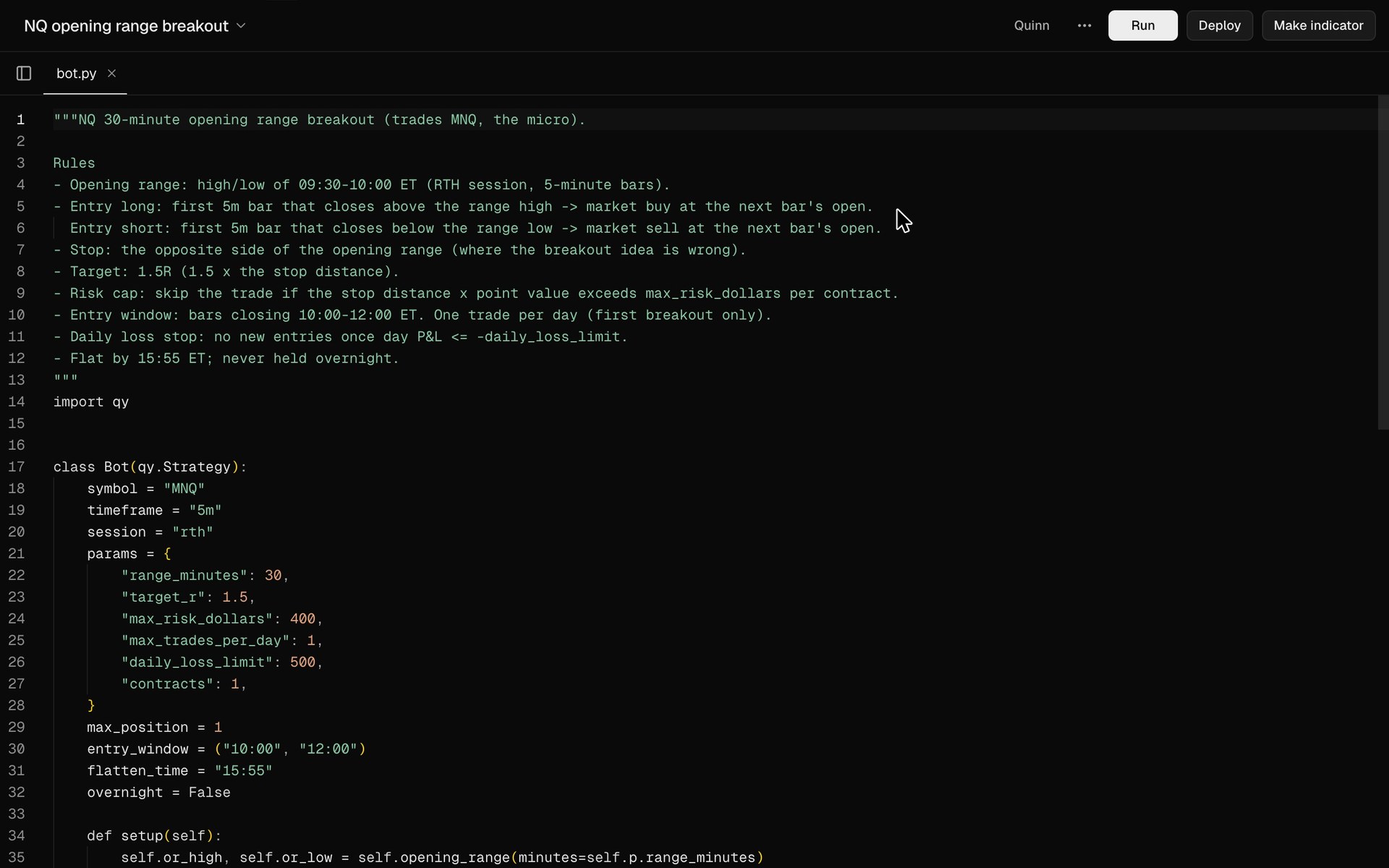
- 03 · Deploy
Put it on TradingView.
Copy the Pine Script into TradingView’s Pine Editor and add it to your chart. It runs on your own TradingView account, and QuantReplay never places or sees an order.
How deploying worksindicator.pinePine Script v6//@version=6indicator("Opening range", overlay = true)length = input.int(30, "Minutes", minval = 5)sess = input.session("0930-1600", "Session")tz = "America/New_York"inSession = not na(time("", sess, tz))newDay = inSession and not inSession[1]var float rangeHigh = navar float rangeLow = navar int endsAt = naif newDay rangeHigh := high rangeLow := low endsAt := time + length * 60000else if inSession and time < endsAt rangeHigh := math.max(rangeHigh, high) rangeLow := math.min(rangeLow, low)hi = inSession ? rangeHigh : nalo = inSession ? rangeLow : naplot(hi, "High", style = plot.style_linebr)plot(lo, "Low", style = plot.style_linebr)
An example script, for illustration.
Recorded in the app: Quinn, our AI, writes a strategy’s code from one sentence. Indicators come out the same way, as Pine Script.
Popular strategies, tested.Failures included.
We wrote the setups traders share most as code and backtested each one, with costs and an out-of-sample period. 0 of 35 papers held up out of sample.
Liquidity sweep + break of structure
MES · 1 min · ICT and liquidity · Popularized by TJR
No edge after costs: profit factor 0.98 out of sample.
0.98
PF out of sample
15-minute opening range breakout
MNQ · 5 min · Breakout
Marginal: profit factor 1.07 out of sample, not clearly above break-even, t = 1.1.
1.07
PF out of sample
ICT Silver Bullet
MNQ · 1 min · ICT and liquidity · Popularized by ICT (Michael J. Huddleston)
No edge after costs: profit factor 0.95 out of sample.
0.95
PF out of sample
VWAP mean reversion
MES · 5 min · Mean reversion
No edge after costs: profit factor 0.68 out of sample.
0.68
PF out of sample
9/21 EMA cross
MES · 5 min · Momentum
No edge after costs: profit factor 0.76 out of sample.
0.76
PF out of sample
London breakout
MGC · 5 min · Breakout
Depends on the period: it lost in sample (profit factor 0.90) and made money out of sample (1.29).
1.29
PF out of sample
Every firm’s rules, built in.
Sourced bot policies for 19 firms. QuantReplay walks a backtest through a plan’s rules and shows the simulated odds of passing, without connecting to the firm.

The backtest walked through a plan’s rules from one start date, then from every other day.
- Apex Trader Funding
- Topstep
- Tradeify
- MyFundedFutures
- FundedNext Futures
- Take Profit Trader
- Elite Trader Funding
- Bulenox
- TradeDay
- Alpha Futures
- Lucid Trading
- Funded Futures Network
- Earn2Trade
- Funded Futures Family
- FTMO Futures
- Top One Futures
- Phidias Propfirm
- Goat Funded Futures
- AquaFutures
One plan. Everything in it.
QuantReplay
Billed $49.99 a month from the day you subscribe, until you cancel. Cancel anytime in Settings.
All payments are final. No refunds, including for partial months.
Get started- Make indicators: describe one and get Pine Script for TradingView
- Quinn, our AI, talks through your strategies and builds, edits and explains them with you, within daily and monthly usage limits
- Backtests with costs on every fill, and Monte Carlo simulations on simulated markets
- Your strategy walked through prop firm plan rules, with simulated pass odds
- Deploy to TradingView: your Pine Script, one click from your chart
Prices in US dollars; taxes may apply. The plan renews automatically every month at $49.99 until you cancel, which you can do anytime from Settings in QuantReplay. QuantReplay doesn’t place trades; prop firm and broker fees are billed by those companies.
Straight answers.
What traders ask before they trust an AI with a strategy.
You describe an indicator or a strategy in plain English and the AI writes the Pine Script. You test a strategy with a backtest, Monte Carlo simulations and prop firm rules, then deploy it to TradingView.
No. You describe the idea and the AI writes the code. You can read every line and change it yourself if you want to, and if TradingView’s Pine Editor shows an error, you can paste it back and the AI fixes the file.
QuantReplay writes plain Pine Script v6. You copy it into the Pine Editor on your own TradingView account and click Add to chart. Nothing connects to your TradingView account, and QuantReplay isn’t affiliated with TradingView.
A range of outcomes under simulated conditions. It resamples a backtest’s trading days, or the trades you bring back from TradingView, into many paths, then shows how wide the results could be: the median, the worst cases and the risk of ruin.
It doesn’t show whether a strategy will make money. A short or overfit backtest makes it look better than it is, and it can’t include anything the backtest never saw. Results are hypothetical.
No. They are a simulation: your backtest’s trading sessions, quiet days included, resampled through the evaluation’s rules thousands of times, with each trade’s worst intraday move checked against the limits. Every figure comes with its 95% interval. They show how past results interact with the rules, not what will happen next, and a small sample makes them unreliable.
6 of the 19 firms we track, including Apex, TradeDay and Alpha Futures, prohibit automation. Topstep allows it through its API Access add-on but requires orders from your own computer, not a VPS or remote server, and its Live Funded accounts can’t use the API.
Every firm’s policy is shown with its sources and the date it was last reviewed. Always confirm with your firm before you automate anything.
No. QuantReplay doesn’t connect to brokers or prop firms and never places an order. It writes code and tests strategies on past data. If you trade a strategy, you do it yourself, on your own platform, and the decision and the risk are yours. Nothing in QuantReplay, the AI’s replies included, is investment advice.
Yes. The Pine Script is a plain text file you copy out, and a strategy’s tested version is a plain Python file. You can read, edit and copy every line.
Your indicators, strategies and chats are yours alone: other customers can’t see them. They are stored in our database at Supabase, and we don’t publish, sell or trade your strategies. When you chat with the AI, your messages and the relevant code are sent to Anthropic’s API to generate replies. The privacy policy has the details.
No. The plan is billed from the day you subscribe and renews every month until you cancel from Settings, under Billing. Canceling stops the next renewal, and the plan runs to the end of the month you paid for. All payments are final: we don’t give refunds, including for partial months. See the terms.
Build your edgein the markets.
$49.99 a month. Cancel anytime.
From an idea to your chart
Describe it, test a strategy with simulations and your prop firm’s rules, then take it to TradingView.
- Indicators and strategies in Pine Script
- Backtests, Monte Carlo and prop firm rules
- Deploy to TradingView